Four 100s on PageSpeed Insights
I went through everything Lighthouse flagged on this site and fixed it. Now PageSpeed Insights on mobile shows 100 in all four scores, and 2/2 on Agentic Browsing.
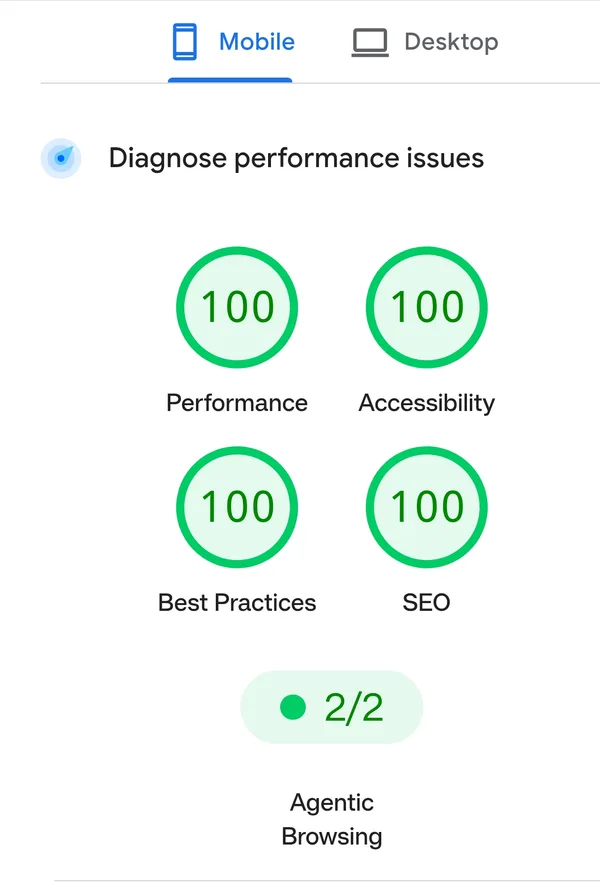
None of the fixes were big. Most were one or two lines. Here is each one, and why Lighthouse cared.
Screenshots that were way too big
My Scout case study has a dark and a light screenshot for each of seven views. I took them on a retina screen, so they were PNGs about 3,700 pixels wide. A phone showing them at around 400 pixels still downloaded every one of those pixels.
Now each screenshot comes in WebP at 800, 1400 and 2200 pixels wide, and srcset lets the browser pick one:
<img
  src="/projects/factors-scout/export-dark-1400.webp"
  srcset="/projects/factors-scout/export-dark-800.webp 800w,
          /projects/factors-scout/export-dark-1400.webp 1400w,
          /projects/factors-scout/export-dark-2200.webp 2200w"
  sizes="(min-width: 72rem) 68rem, calc(100vw - 2rem)"
width="3684" height="2484" alt="..." decoding="async" />srcsetlists the files and their real widths.sizestells the browser how wide the image will show, before any CSS loads. On a phone that is the screen minus the side gutters.widthandheightkeep the ratio, so the page doesn’t jump when the image arrives.
On mobile, the images on that page went from 578 KB to 73 KB. The gallery on /sites got the same treatment, with 400 and 720 pixel sizes.
I didn’t make those files by hand. A 22 line script with sharp writes them next to the originals. This is the line that does the work:
const { size } = await sharp(src).resize({ width: w }).webp({ quality: 82, effort: 6 }).toFile(out);It skips any size larger than the source, so a small screenshot never gets blown up. After adding a new one, I run node scripts/optimize-images.mjs.
The biggest image was lazy-loaded
On /sites, the first screenshot is the Largest Contentful Paint, the biggest thing on screen when the page opens. I had loading="lazy" on every image in the gallery, that one too. So the browser held it back until it worked out the layout.
Now the first one loads right away with high priority, and the rest stay lazy:
loading={i === 0 ? 'eager' : 'lazy'}
fetchpriority={i === 0 ? 'high' : undefined}
A logo that said a different name
The logo reads “munawarahmed.com”. Its aria-label said “M Munawar Ahmed, home”. Lighthouse calls this a label and content name mismatch. Someone using voice control sees “munawarahmed.com” and says that, but the link is named something else, so nothing happens. Now the label starts with the visible text: “munawarahmed.com, home”.
Links without an href
The template drawer on /mobifreaks has “Open full page”, source and download links. A script filled in their href when you opened a template. So in the HTML they were <a> tags with no href, and crawlers can’t follow those. Now they ship with the first template’s links, and the script still swaps them as you browse.
A forced reflow on load
Every page has a small script that sets the browser bar colour (theme-color) to match the current theme. It read the computed style right away, before the first paint. That made the browser work out all the styles early just to answer it, and Lighthouse showed it as a forced reflow. Running it after the first frame fixed it:
requestAnimationFrame(function () { setTimeout(syncBar); });What was already there
Some of the score came from earlier choices. The site is static Astro, so every page is plain HTML built once. Google Analytics waits for your first scroll, tap or key press, or 3.5 seconds after load, before it downloads. The Vercel analytics scripts are deferred. I wrote about keeping the site static when I added them.
You can test your own site at pagespeed.web.dev.